The Reverse Geocache Puzzle ™

The "Reverse Geo-cache" Puzzle

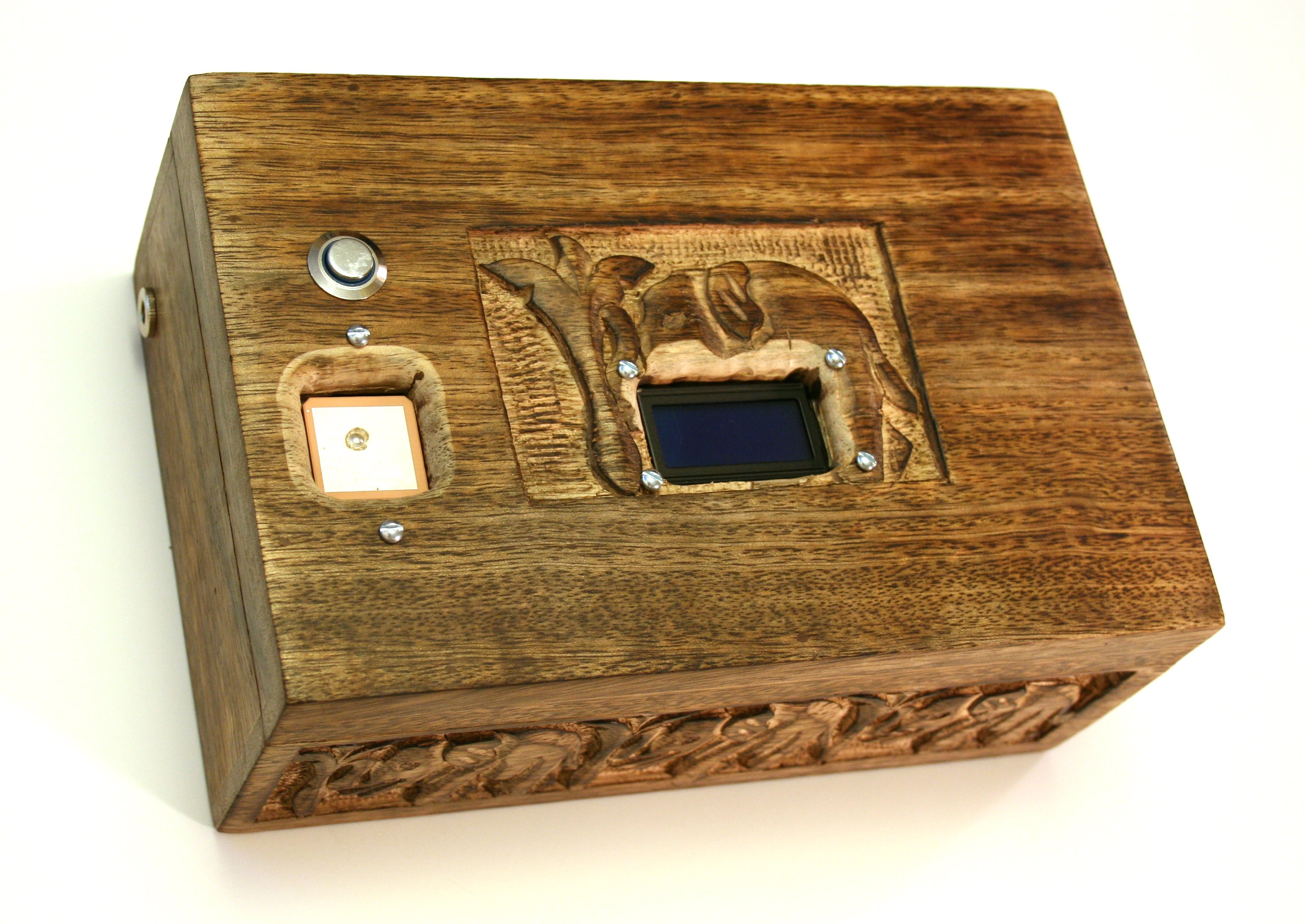
Fig. 1 - The Box

[Make sure you read the sequel to this story when you're finished here.]

Early this summer, the friend who first introduced me to Arduino amazed us with the news that he was moving to France to get married. Once I recovered from the surprise, it occurred to me that putting together some sort of Arduino-based wedding present might be a uniquely fitting thanks for his years of friendship and for helping get me started in this delightful enterprise. And so after weighing several ideas — I didn’t fancy adding some ugly techno-junk to the pretty collection of tea cozies and china sets — I finally settled on building the device I describe here: a puzzle box that won’t open until it is taken to a certain location.

To better understand my conception, let’s fast forward and imagine the gift opening. The new couple, freshly back from their honeymoon, remove the wrapping to reveal a book-sized wooden box elaborately carved with elephant images. (I didn’t carve it; I bought it that way at World Market.) Mounted into the lid, perhaps incongruously, are an illuminated button, a small display, and a mysterious module that sharp-eyed readers might recognize as a GPS. There’s also some kind of connector tucked away on the box’s left side. More about that later.

What do they make of all this? It’s hard to guess, but naturally I imagine they might try to open it up and take a look inside. When they do, however, they find the lid stuck tight — it seems to be latched from the inside. Will they push the button? Pretty buttons are awfully hard to resist, so let’s assume so. The blue display fires up and displays a friendly, personal greeting:

Bonsoir, famille Immel!
This is attempt 1 of 50.

Huh?

Now they don’t know this yet, but the box’s embedded electronics require a good GPS fix – something that’s probably hard to come by inside a Parisian apartment. And so the display flashes “SEEKING SIGNAL” for a couple of minutes and gives up.

No signal acquired...
Powering off...

Now my hope is that they’ll realize they need to take the box outdoors or near a window. Is that a stretch? I don’t think so. My friend is a patient fellow with an engineering background, so I expect he will at least try moving it before throwing it against the wall or chiseling off the hinges. Let’s assume, then, that they go outside and push the button again. This time the series of messages is different:

This is attempt 2 of 50.
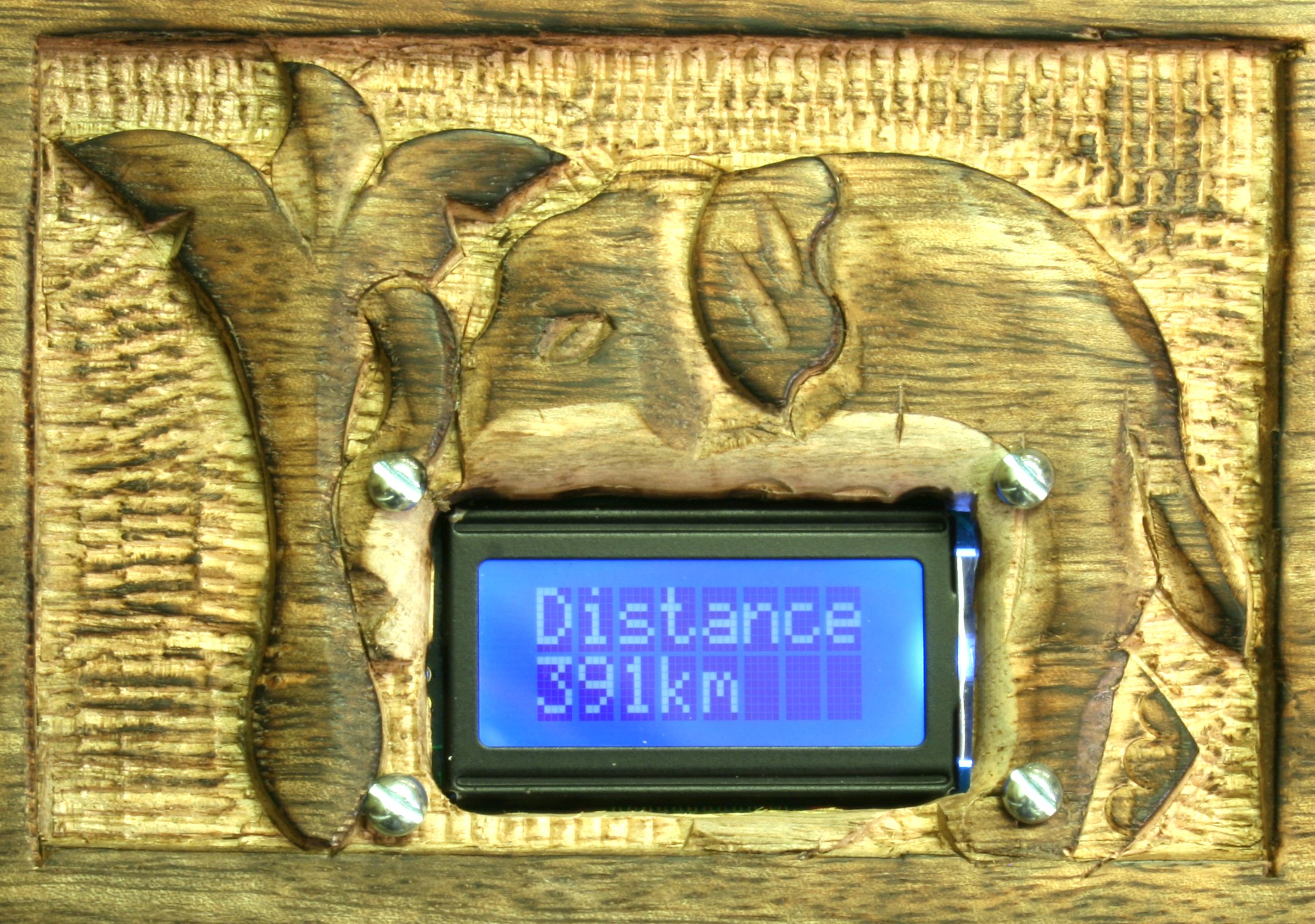
Distance 391km
*Access Denied*
Powering off...


Fig. 2 - Distance 391km

Fig. 2 - Distance 391km

Hmm. What does “Distance 391km” mean? “Access Denied” suggests that getting inside the box is indeed the objective of all this button pushing. Just for fun, let’s try again.

This is attempt 3 of 50.
Distance 391km
*Access Denied*
Powering off...

Uh oh. We seem to be consuming our limited supply of “attempts”. The “No signal” problem seems to be solved, but the message “Distance 391km” remains puzzling. Does the box know its own location? Is there something 391 kilometers away? London? The Hague? A circle of that radius drawn around Paris intersects quite a few interesting places in France, England, Holland, Switzerland, and Germany.

Knowing my friend, he will eventually think to move the box to a new location to see how the message changes. Let’s imagine, then, that he hops in his car and motors down the A11 to the famous city of Le Mans, about two hours to the southwest. After a brief tour of the cathedral and a snack at a sidewalk café, he pulls the elephant box from his backpack and pushes the button again.

This time the display is once again slightly different:

This is attempt 4 of 50.
Distance 226km
*Access Denied*
Powering off...

Aha. We seem to be getting somewhere. If we are in fact looking for a specific place, it would appear that it is 391 kilometers from Paris but only 226 from Le Mans. As you can see by the map in Figure 3, there are only two places on earth that meet these criteria – a spot just off the northern Brittany coast, and a rural area in the southwest near Bordeaux. And, as my friend is aware, one of these can be quickly eliminated simply by taking a third “reading” in a new spot.
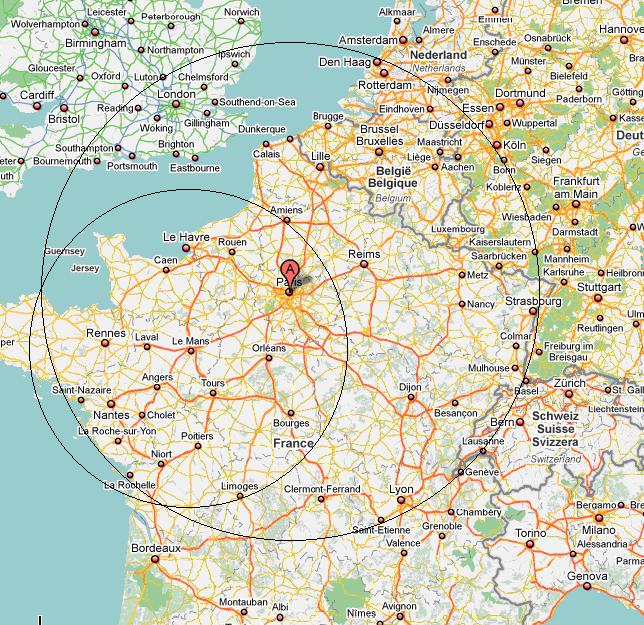
Fig. 4 - and a circle around Le Mans

Fig. 3 - Circles around Paris and Le Mans

I suspect that from here things will proceed relatively quickly. My friend will triangulate that the “magic spot” is Île-de-Bréhat, a tiny island just a short ferry ride off the northern coast of Bretagne. If and when the couple do bring the box here, they’ll be greeted with a congratulatory “Access Granted!” and the whir of a motor announcing that the treasure inside is about to be finally revealed!
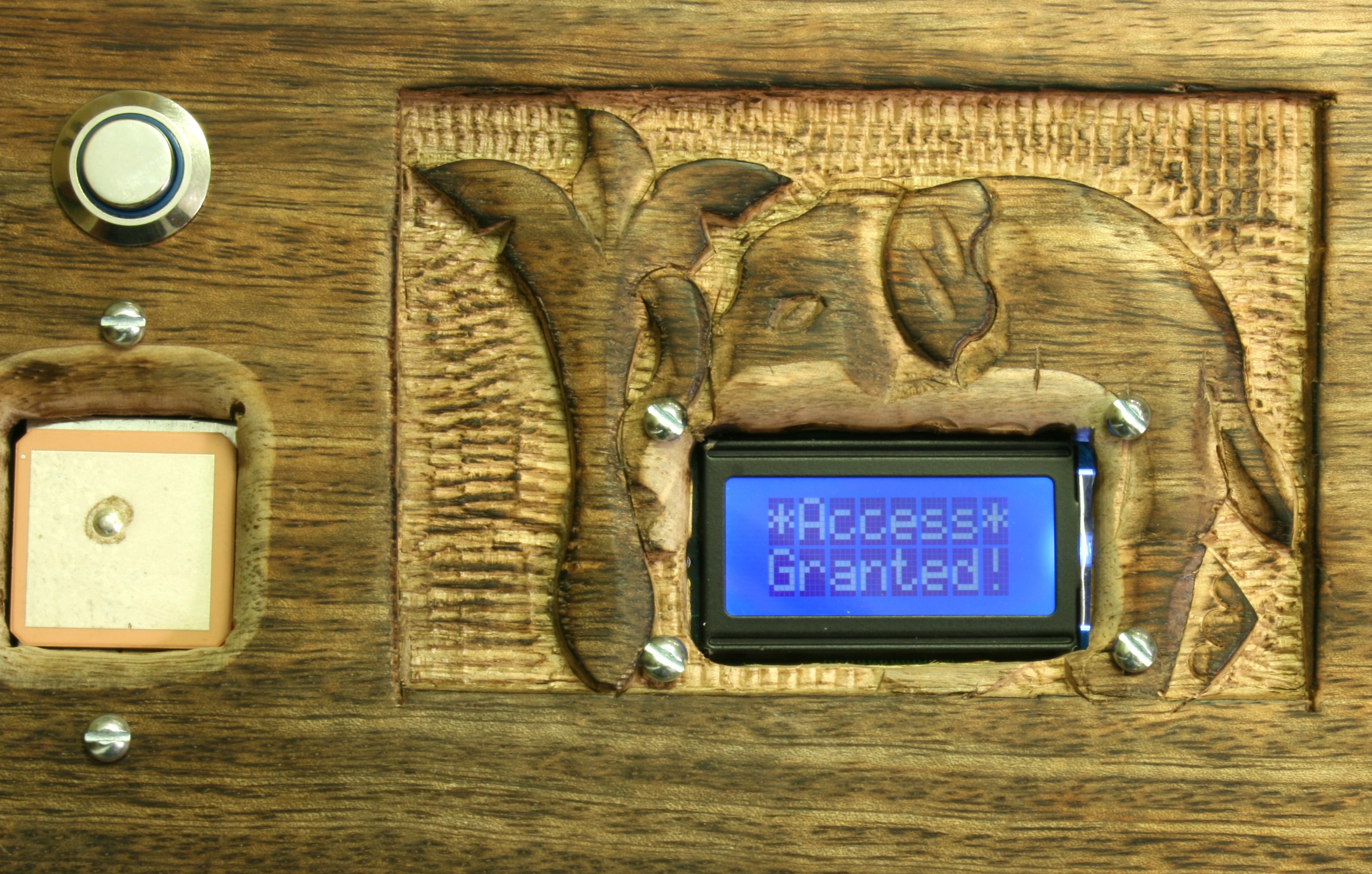
Fig. 5 - The box is unlocked!

Fig. 4 - The box is unlocked!


Hardware

The electronics for this project are fairly simple. At the core, of course, is the Arduino, surrounded by a handful of devices that talk harmoniously through various native and third-party libraries. The peripherals are wired to a custom “shield” that I soldered together. The shield design makes the system modular and easy to disassemble for moving. Power is provided by 4 AA lithium batteries mounted in the box’s interior.

Major components
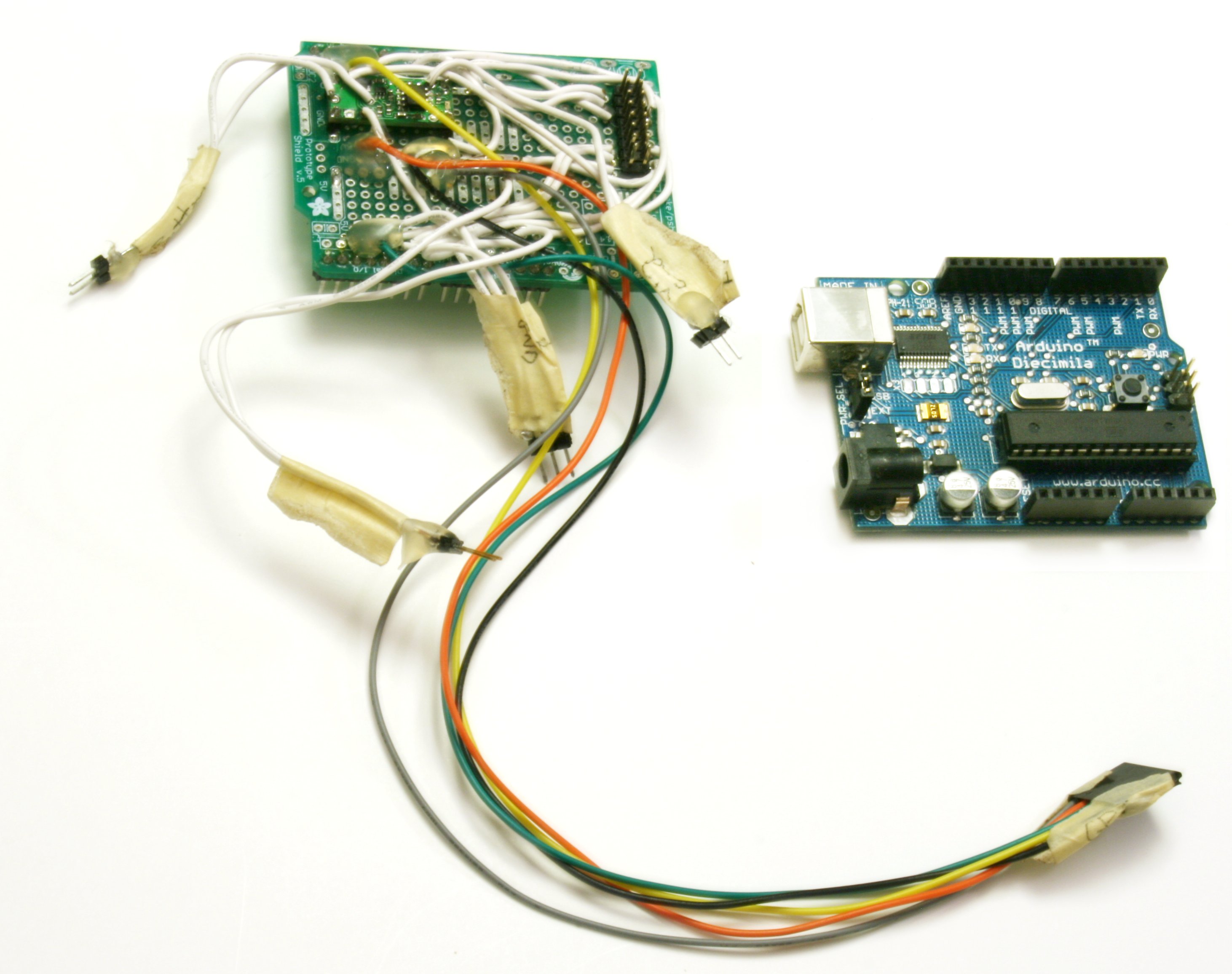
Fig. 6 - Arduino and the custom shield

Fig. 5 - Arduino and the custom shield

1 Arduino Duemilanove
1 USGlobalSat EM-406A GPS module
1 8×2 blue backlight HD44780 LCD
1 Hitec HS-311 servo motor
1 illuminated pushbutton
1 low voltage Pololu power switch
1 2.5mm female DC power connector
1 Adafruit Arduino prototype shield
1 ornamental box

Minor components

1 severed chopstick used as latching dowel
3 #14 eyelet screws
1 Battery pack with 4xAA lithium batteries
Various mounting screws and glue
Wire, headers, solder, and other circuit connecting items

I designed this project to last a long time. The batteries are locked inside the box and can’t be replaced if they run down — not while the puzzle remains unsolved, anyway — so it’s important to conserve power. That’s why a given “session” lasts at most 2-3 minutes before the system powers off. Furthermore, the owner is allowed only 50 attempts to discover the box’s secret, so the active lifespan of the batteries need be no more than about 150 minutes. Between sessions, the electronics draw virtually no power and should last idle for years.
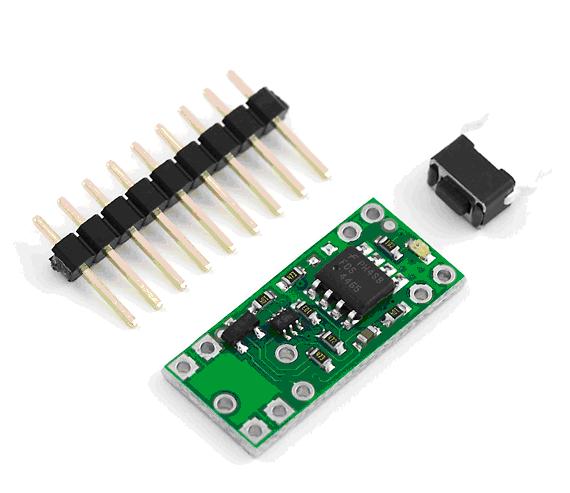
Fig. 7 - The tiny Pololu switch

Fig. 6 - The tiny Pololu switch

The secret to this power conservation is the clever little Pololu switch, which gives a circuit the ability to completely turn itself off through software. When you push the button, it latches and distributes power to the system. When the sketch decides it’s time to shut down — either because it can’t find a GPS signal or it’s not close enough to the target — it simply brings the Pololu’s power control pin high, cutting power. In this “off” state the switch draws just 0.01 microamps.

Fig. 8 - The EM-406A GPS module

Fig. 7 - The EM-406A GPS module

Like most GPS units, the EM-406A generates a stream of NMEA position data. This stream enters the Arduino via a “soft” serial port managed by my NewSoftSerial library. The NMEA data is parsed into latitude/longitude using TinyGPS, a popular library I built especially for this project. If the GPS is getting a good fix, the box can determine its location within 10 meters and, through a simple calculation, how close it is to the target.
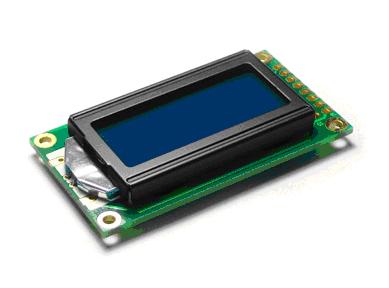
Fig. 9 - The 8x2 Liquid Crystal Display

Fig. 8 - The 8x2 Liquid Crystal Display

The display is an HD44780-compatible device controlled by the Arduino LiquidCrystal library. I wanted to incorporate some visual effects like flashing and scrolling, so my sketch contains several custom display routines. These were carefully written so as not to block the all-important serial input stream coming from the GPS.
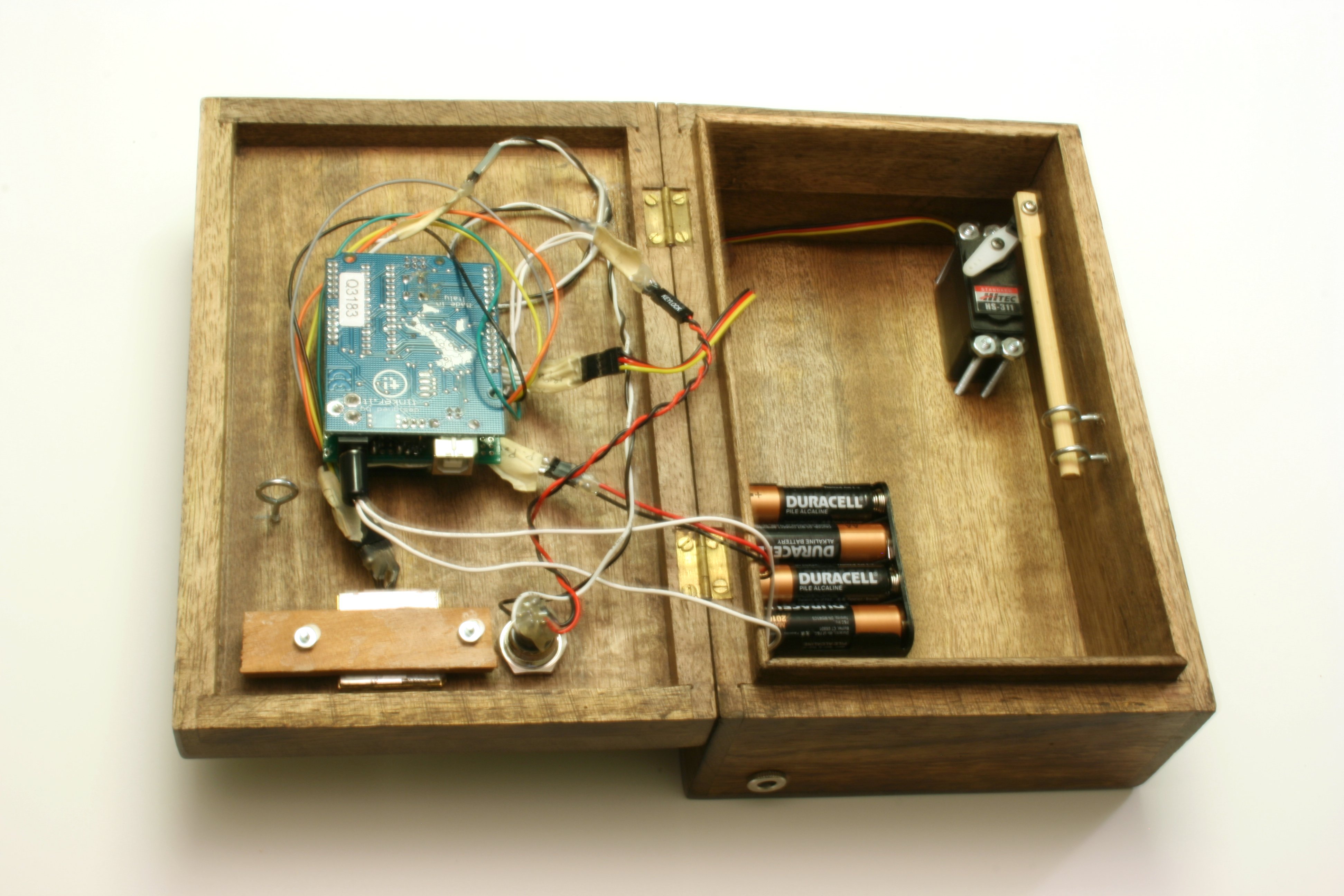
Fig. 10 - The interior showing chopstick latch

Fig. 9 - The interior showing chopstick latch

The internal latch is built around a Hitec servo, three eyelet screws, and, as a sentimental salute to the little Chinese restaurant my friend and I used to eat at, a dowel made from one of its chopsticks. One chopstick end is attached to the servo arm, and the other threaded through the two eyelet screws mounted into the box bottom. The servo operates in one of two positions – “open” and “closed”. When instructed to close, it drives the chopstick laterally through a third eyelet screw hanging from the box lid. At this point, the box is latched. Once the puzzle is finally solved, the servo pulls the chopstick back, and the box can again be opened.

Software

The box is running the Arduino version 0016 framework. The sketch I wrote uses native libraries Serial, Servo, and LiquidCrystal, as well as several of my own: TinyGPS, NewSoftSerial, PString, Streaming, and Flash. My libraries are freely available for download at Arduiniana.org.

Conceptually, the software is fairly straightforward. At power up, the system hunts for a GPS signal. If it detects that the box is within 2 kilometers of the target spot — in this case the center of the little island — it unlocks the latch. Otherwise, it displays the somewhat cryptic “Distance: nnn km” and keeps the latch firmly locked.
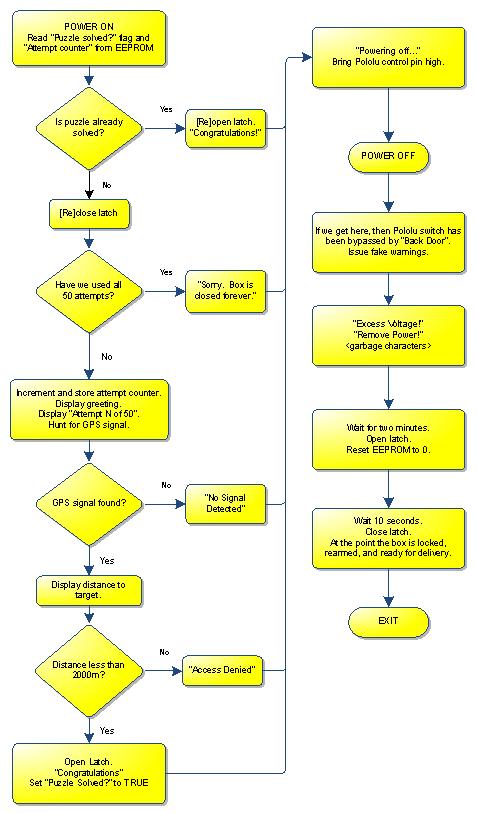
How the software works
How the software works

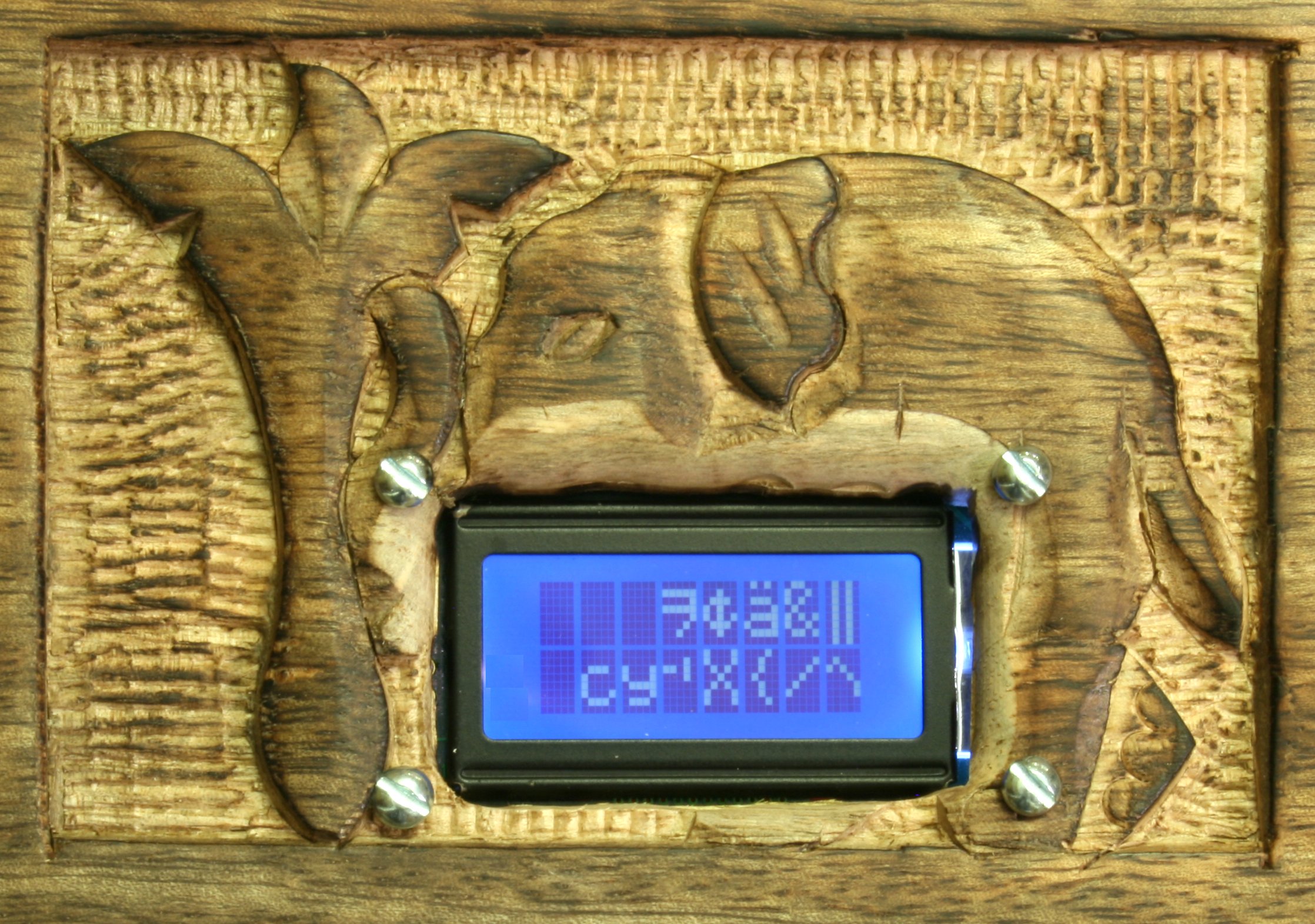
Fig. 11 - A fake voltage overload

Fig. 10 - A fake voltage overload

The Back Door

It may seem risky to create a device that can only be activated a limited number of times before it locks permanently. What happens if the bride’s four-year-old gets hold of it? What if the batteries unexpectedly run out? What if, despite all my care and attention, there are still bugs in the implementation? Will the treasure inside be forever sealed? To address these concerns, I built a “back door” into the design. This is where the mysterious 2.5mm coaxial connector to the left in Figure 1 comes in.

If you apply some current here at a reasonable voltage, the system will power up just as if you pressed the button. But since this circuit bypasses the Pololu switch, when the box claims to be “Powering down”, it is actually lying. Instead, after a two-minute delay, the latch opens, regardless of where the box is actually located. This gives the sheepish designer (me) emergency access and one more chance to replace the batteries or repair the latest design flaw.

You might question whether it’s a good idea to leave such a gaping back door. After all, it’s a lot easier for my friend to open the box by simply plugging it in than driving it the 391 kilometers to Bréhat. Quite true. So to dissuade him from snooping too far down this path, I built in a few frightening messages. Remember, he has no idea how to use this “back door” or what voltage and current to apply. If he does figure out how to power the box this way, I feel fairly confident that whatever satisfaction he gains will rapidly disappear when the LCD starts flashing the completely fake warnings

Excess Voltage!
Remove Power!

And if these aren’t discouraging enough, they are followed by a blast of random “garbage”, suggesting that a critical failure is underway. (See Figure 10.) Whoever opens the box this way will have to stare at these ominous characters for a full two minutes.

Last minute disasters

Just a couple of days before I left for France I made a pretty serious mistake. At the time I had completed the physical construction and was just beginning the first full-scale closed-lid tests. Everything was going swimmingly – so smoothly, in fact, that I became a bit cavalier about my methodology. To address an intermittent problem, I made the last-minute decision to upgrade my system software. Reflecting back, I should have done plenty of preliminary “open box” tests before sealing it up; instead, riding the wave of my enthusiasm into disaster, I uploaded the new version, confidently closed the lid, and pressed the button. The latch engaged normally, but then the whole system went haywire. The motor began jerking crazily and the LCD limped along, displaying dimly only the top halves of each message. Soon I discovered that I had locked myself out of my own box and that disassembling it was the only way to recover. Because I had designed it to be somewhat tamper proof, this was far from easy. Ultimately, I had to break a bracket to get a screwdriver far enough into the interior to pry open the latch.

In France I had left myself just one short day to reassemble the box (which had been taken apart to increase my chances with airport security), run some last-second tests, and perform the final reset. When it came time to rearm it, something you do by connecting power to the “back door” for four minutes, I found that I had brought the wrong power supply with me. I fruitlessly combed the house I was staying in for a telephone or router with a 2.5mm connector, and then tried desperately to locate the French equivalent of a Radio Shack. After my panic subsided I realized I could just jimmy up what I needed with a couple of paper clips. It wasn’t pleasant or easy to hold those clips in place for four minutes, but I finally did manage to rearm the box with mere hours to go.

Frequently Asked Questions

What happened when they unwrapped the box?

The day after the wedding, the bride’s family hosted a brunch in the back lawn of their beautiful country house. I hadn’t expected to be present at the opening, but at one point I noticed some furtive activity in the corner of the lawn and saw that the box was being passed around, accompanied by much head scratching and gesturing in my direction. My friend, who had apparently already consumed three “attempts”, was darting back and forth exhorting everyone in halting French “Ne poussez pas le bouton!” (“Don’t push the button!”). To his dismay, his new father-in-law didn’t understand and pushed it anyway. Several people approached me to ask questions about the box, which I apologetically declined to answer. At one point a friend of the family, a charming gentleman from up the street, said to me with a thick accent, “You are — how you say in English? — a BASTARD!” That one comment made this whole project worthwhile. As of this writing I do not think they have yet managed to open the box.

What did you put inside?

With all the electronics, there wasn’t much room inside the box for anything too substantial. I put in a few local (US) gift cards to entice them to visit soon, a set of Kazuo Ishiguro audio books (on a USB key), and an overly sentimental card. And of course, as I pointed out in the card, if either of them fancies doing a little Arduino development, there’s a perfectly good Duemilanove to play with, not to mention an LCD, a servo, and a GPS.

How did you choose the target location?

Île-de-Bréhat, a charming island where motorized vehicles are prohibited, is a special place for this couple. It was while my friend was filming a movie here that he first began to realize his feelings for the young lady starring in it. And she for him, if I understand correctly. To help matters, the bride’s family owns a house here, making it a doubly attractive destination. (I may be a bastard, but I’m not going to make them travel 400 kilometers to some random, isolated location just to open a few gift cards.)

How did you get it through airport security?

I worried a lot about this. At first, when I was not certain whether I would be able get to France to attend the wedding, I had thought to present them the fully “armed” box while they were visiting the US. Fortunately, someone pointed out the foolishness of this idea. Can you imagine the interview at airport security when the hand soldered electronics show up in the X-ray?

Sir, did you pack this yourself?– No.


What’s inside?– I have no idea.


Can you open it please?– Nope.


Eventually, I decided that the best strategy was to disassemble it as much as practically possible and hope that none of the individual pieces were sufficiently suspicious to warrant being detonated on the tarmac. This seemed to work. I brought the disassembled box on two major trips without a hint of trouble.

Why limit the number of attempts to 50?

Two reasons. First, a puzzle is just more exciting if it is bounded. If it’s fun to solve a Sudoku, how much more fun is it to try and do it in under ten minutes?

The second reason is a practical one. I needed some way to make sure that power consumption would not end up being a problem. How disappointing would it be if, after all the work I put into it, the batteries ran out and the puzzle was ruined? Constraining the number of attempts helps ensure that this won’t be an issue.

The number 50 has no special significance. 25 or 20 would probably have worked just as well.

Why the 2000-meter tolerance?

There is always a little bit of error in a GPS reading, so some tolerance is necessary. The island is about 4 kilometers across, so setting the tolerance at 2000 meters forces them to actually ferry across to it without constraining them to any particular part.

Conclusion
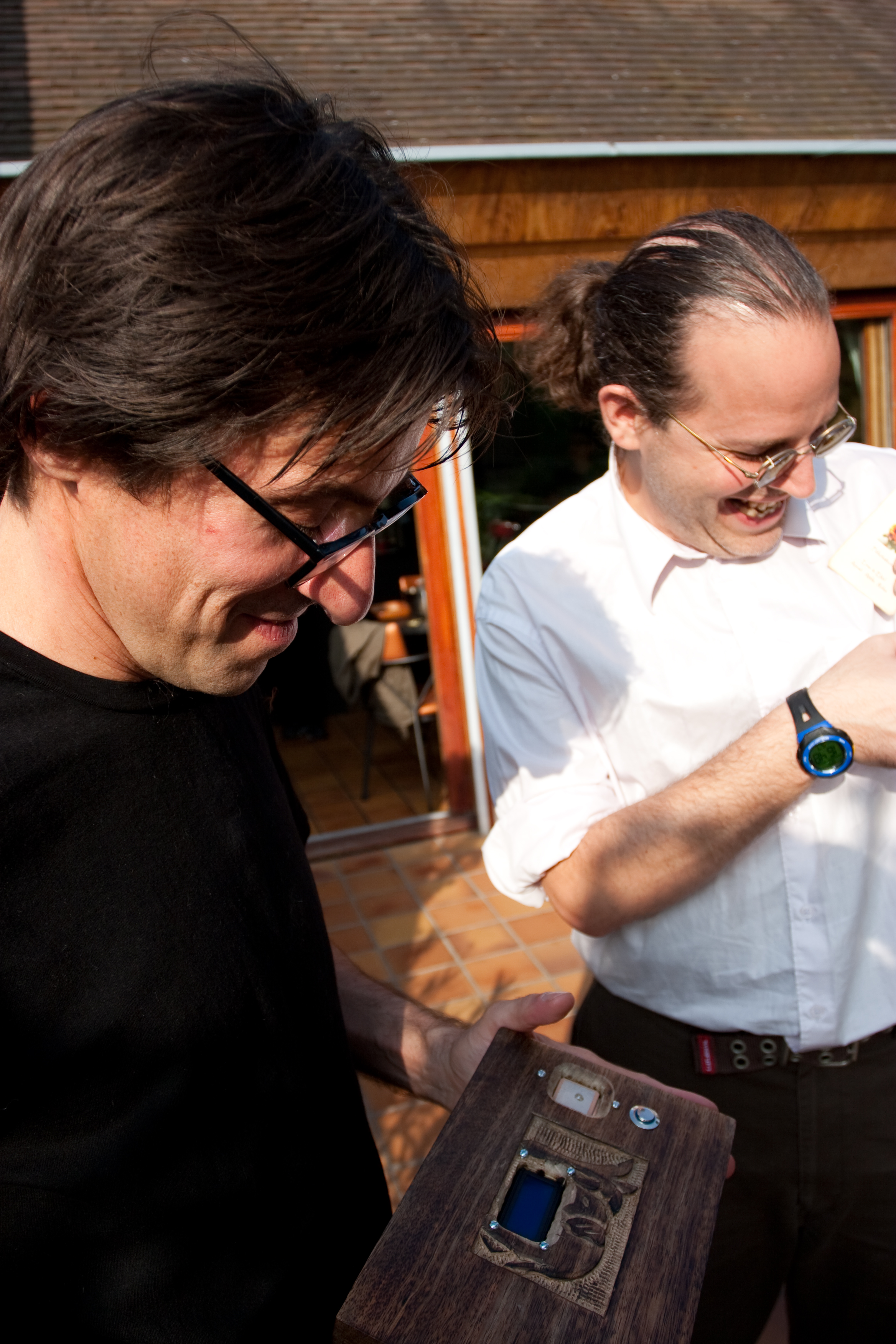
The box is unwrapped

The box is unwrapped

Building this project was a joy. It was rewarding to conceive of a relatively unique GPS application and to work through the various problems as they arose. Designing the latch, for example, was a challenge I spent a good deal of time on. My experience solving mechanical problems is fairly limited, but I’d like to think that the next time I build something with a mechanical component I’ll be able to approach it with a little more savvy. Meanwhile, when you think about all the cheap sensors, displays, lights, motors, modules, radios, and buttons you can attach to an Arduino, you realize that imagination is the only constraint on the kinds of projects that can be built. This little box is a novel way of combining a GPS, a servo, a button and a display. How many more marvelous combinations lurk out there, if only someone has the imagination to put them together the right way?

[Make sure you read the sequel to this story when you're finished here.]

Page last updated on February 21, 2010 at 6:48 pm
147 Responses → “The Reverse Geocache Puzzle ™”

  1. Andrew

    6 months ago

    This is an excellent gift idea and as such, I made a Parallax Propeller based one for my wife’s birthday last week. Details can be seen at http://forums.parallax.com/forums/?f=21&m=414611

    Thanks for the EXCELLENT idea Mikal!!!


  2. Peter

    6 months ago

    A wonderful read and a fantastic gift, you should give yourself a pat on the back as few people can give a gift so unique and personalised.

    I’m off to read the follow-up post.


  3. Andrew

    6 months ago

    Mikal,

    I have built a reverse geocache puzzle box like yours. I have one problem, though. I can’t correctly calculate distance. Could you help me, or tell me how you did it?

    Backstory: I just finished building this thing and making sure all the hardware works. I saved the distance calculation as the last thing to implement because I thought it would be the easiest. Boy, was I wrong. The plan is to use this to propose to my girlfriend…tomorrow. I would forever sing your praises if you could give me a hand.


  4. Mikal

    6 months ago

    Check your email, Andy. :)

    Mikal


  5. Grangoire

    6 months ago

    A better backdoor would be to wire two of the screws used for the LCD to the input, so the inconspicuous screws normally assumed to just hold hardware in place are also infact the backdoor contacts.

    You could even wire it directly to the internal voltage, and make sure the screws are recessed. That way you just need to somehow bridge the two recessed screws.


  6. Mikal

    6 months ago

    Quite right! Other people suggested using the box hinges as an extremely innocuous back door.

    Mikal


  7. Anonymous

    6 months ago

    Ah yes.

    And inside is the key to the Bride’s chastity belt


  8. Will Finch

    6 months ago

    Beautiful :-)


  9. Christopher

    5 months ago

    I really like this idea. Do you sell these boxes?


  10. Martha M

    4 months ago

    I think this is the coolest thing ever and I am trying to make this for my hubby who is graduating Nursing School. But once I bought all of the components I am unsure as to what to do next. I was able to hook up the moter and the chopstick but I see all of the library of languages you have and was wondering which ones do I have to add and were? Could you tell me what to do first? thanks!!!


  11. Steven

    4 months ago

    I would love to make one of these boxes for my wife. any chance on getting some instructions to make it?


  12. Thomas Thompson

    3 months ago

    This is such an amazing project. Great job bringing this from conception to reality. It is so cool that we live in a world where the means to accomplish something like this are so readily available… if only someone has the imagination and patience to make it happen.

    Keep up the great work.


  13. Peter G.

    3 months ago

    Hi Mikal,
    Many thanks for this nice idea !!!
    I trying to built a reverse geocaching puzzle box like yours for a gift, but with some small changes. So I will put inside the Box two servos. One to latch the box and the second to open the box. Also I would make a wrench with bolt to press the push button and finaly, inside the box a matrix keyboard like this: http://www.conrad.de/goto.php?artikel=709840 to enter the coordinates from google maps. But I need some hints, and I hope you could help me? How you recognise bypassing the Pololu switch?
    Also I can’t correctly calculate distance. My main problem is, that my english isn’t well and so I hav many mistakes in my source code …
    I hope you could give me a hand.

    Peter


  14. Mikal

    3 months ago

    Hi Peter. Thank you for the kind words.

    The “secret” to knowing when you have bypassed the pololu switch is to execute some code just after that line that turns the switch off. If that code runs, then you know you have bypassed the switch, because the power isn’t off! :)

    I use Maarten Lamers’ code to calculate distance: http://www.maartenlamers.com/nmea/.

    Mikal


  15. Peter G.

    3 months ago

    Thanks Mikal,
    now I understand the trick with the backdoor. I hope the same with the calculating in the next days …

    Peter


  16. John S

    3 months ago

    Mikal,
    Great project! Are you just applying the output voltage/gnd from the pololu switch to the 5V/Gnd pins of the arduino? That’s what I intuit, but want to make sure I’m not missing something.

    Thanks!


  17. Mikal

    2 months ago

    Thanks, John! Yup, you intuit correctly. And there’s a wire running back from a digital pin back to the Pololu control pin.

    Thanks for the comment.

    Mikal


  18. Sean

    2 months ago

    this is really cool!

    i am currently building my own one as a gift and just had one question.

    how have you connected the small 6pin plug from the GPS to your PCB?

    cheers in advanced

    /Sean


  19. Mikal

    2 months ago

    Hi Sean–

    Thanks! In my original designs what I did was cut the tiny cable that comes with the EM-406A and solder the tiny wires to a 0.1″ header. More recent designs use a custom PCB with a little 6-pin JST connector soldered directly.

    Mikal


  20. Andreas

    2 months ago

    Mikal,

    Excellent work on all that you do for Arduino. I was inspired by your project and am building one for a very sentimental reason. I, like Andrew, am having issues calculating an accurate distance. I’m using the formula on the site you linked to Peter (http://www.maartenlamers.com/nmea/) but for some reason it’s just not giving me correct values.

    On another note, I have not even added the servo code and I’m already using 11kb of my 14kb of memory, any ideas how to cut that down? It seems NewSoftSerial takes about 4k?

    Thanks for your code and inspiration and keep it up.

    Andreas


  21. Robert Peterson

    2 months ago

    Wow! I want to build one of these. Where and how do I get started on a project like this?


  22. Jordan H.

    2 months ago

    First of this is an amazing idea. I started building my own a week ago. So far I am still in the software development testing phase, but I’ve encountered a problem. I can’t seem to get the NMEA library ( http://www.maartenlamers.com/nmea/ ), which you mentioned in another comment, to work. Also, I’ve noticed that the library can’t even compile without including your NewSoftwareSerial library. However, even after that is included and set up, the NMEA library refuses to decode the data strings while your TinyGPS library works perfectly. I know you didn’t create the NMEA library, but could you please explain how you use it?


  23. Mikal

    2 months ago

    Hi Andreas–

    Thanks for the kind words. Please share your “sentimental reason” when you get a chance. I have been collecting marvelous stories from people who have built or want to buy a Reverse Geocache box, and I’d love to add yours.

    I find the “distance_between” function in the NMEA library very useful. I will probably incorporate it into a future version of TinyGPS. Perhaps you can share an example of an incorrect value you are seeing?

    On the subject of code space, yes, fitting a Reverse Geocache into a 14K space is hard, though doable — my original R. G. barely fits. But a much easier solution is to just get a recent Arduino. The 328 chip has ~30K of available memory. That’s a lot easier than trying to trim.

    Cheers and good luck!

    Mikal


  24. Mikal

    2 months ago

    @Robert–

    Right here’s a good place to start. :)

    Thanks,

    Mikal


  25. Mikal

    2 months ago

    Jordan–

    Thanks for the kind words. Just to clarify, I don’t actually use the NMEA library; it’s really too big for an Arduino. It was designed for a more capable processor. I use TinyGPS to acquire the latitude and longitude and calculate the “distance_to” the desired target using the NMEA library’s distance_to function. I don’t actually use the whole library, just that one function.

    Mikal


  26. Jordan H.

    2 months ago

    I gave up trying to use the NMEA library (or functions within it) and instead just used the example code provided here (second to last post) which seems to work great so far: http://www.arduino.cc/cgi-bin/yabb2/YaBB.pl?num=1259532217


  27. Andreas Lekas

    2 months ago

    Mikal,

    I’m creating my box to propose to my girlfriend. I’m a little hesitant to post this because I’ve been building it right under her nose and even having her help me test it! She has no idea what I’m doing and thinks it’s just another one of my hairbrained projects. It’s starting to get to the point where I have to start building the actual box, though, so I have to be a looooot more careful about what I do. I have a new arduino on order because there’s no way I’m going to be able to fit in 14k. I’m modifying the idea a little bit.

    Instead of having it point to one place via distance, I’m going to make it into a sort of scavenger hunt. A clue on the pillow will point to where the box is. Then the box will have another clue to point to a geographic location that is significant in our relationship. After a few of these, the box will point to the most significant location and open upon arrival.

    As far as the incorrect values go, I decided to sacrifice the space and just do the float calculations. The incorrect distance was due to my trying to calculate the distance with integral latitudes and longitudes.

    Anyway, I’m trying really hard to document my project, but it’s really difficult with how quickly things change. Once I get something somewhat tangible, I’ll provide you a link.

    Thanks again for the amazing work.


  28. Mikal

    2 months ago

    @Andreas–

    Thanks for the kind words and for sharing your exciting story. It sounds like a great concept. How could she say “no” after that? :) I’m collecting puzzle box stories so please keep us informed. That goes for all the rest of you out there!

    Mikal


  29. John S.

    2 months ago

    Like Andreas, I am also building the box for my wife (birthday present) under her nose. When I was having trouble testing my new GPS module, I thought maybe it was because I was indoors. I hooked the Arduino up to the laptop and went out on the back porch. It didn’t take long for her to come out and wonder what I was doing. After explaining about try to get a gps signal, she asked “What project are you going to do now?” I feigned ignorance and said I wasn’t sure. I’m still in the software testing phase, but am getting close to actual box construction. Was finally able to get a gps signal by changing the baud rate from 4800 to 9600. Even get a signal inside the house. Servo testing is up next. I’m going to try and start documenting with photos, but that will certainly invite more scrutiny!


  30. Mikal

    2 months ago

    It sounds like another great story is brewing, John. Thanks for sharing. We all look forward to what happens next. What kind of GPS module are you using?

    Mikal


  31. John S.

    2 months ago

    I found a Progin SR-92 on e-bay for $35. Seems to be working well, now that communication issues resolved. Hooked up the servo and ran into the servo “twitch” issue. I see from research that it has been addressed, but I’m not fully understanding the solution. Look for an e-mail from me.


  32. Andreas

    1 month ago

    @John,

    The servo twitch issue (if it’s the same one I encountered) is due to an incompatibility with NewSoftSerial and the new 0017 version of the Servo library. It has to do with interrupt and how the new Servo library uses them. The solution is to revert back to the 0016 version of the Servo library.

    As an update to my project…I’m currently building the box. Naturally, it’s very difficult to do in secrecy without invoking some kind of suspicion from my girlfriend. So, it’s turned into a sort of open project where she helps me pick things out for to make it look really nice. This has been working well for the last couple of weeks as this has been my excuse to “practice my woodworking skills”. Just the other day, though, things started getting a little out hand. She saw me building the locking mechanism and asked, why are you locking it? This turned into, “Wait a sec, what exactly are you building here? What are all these electronics for?.” So far, my story has been, “I haven’t decided what the final use is, I just wanted to use my GPS and this is how.” It’s working, if only by the skin of my teeth….Anyway, working on getting a blog up with details…I’ve already stained my box, so build details on the actual box will probably be difficult to obtain…but I’ll do my best for everyone interested…


  33. Benny

    1 month ago

    Mikal,

    I too have a ProGin SR-92 and the default baud rate is 9600 even though it claims to be 4800 in the manual. How did you change the default baud rate to 4800?


  34. Mikal

    1 month ago

    Benny, I haven’t tried the SR-92. I use the USGlobalSat EM-406A. The SR-92 datasheet does seem to suggest that 4800 b is the default. Perhaps they changed the firmware without updating the datasheet?

    Mikal


  35. Ted

    4 weeks ago

    Mikal, I just came accross this site and have read some of the info in reguards on how to construct a box like this. I’m in the military and an avid Geocacher. Given my carrer choice I travel alot. Mostly to less desirable locations. I have made a list of compnets that I will need from the info found here. But what I have not been able to find is a Schematic on how to put all of it together. Is there any info that you can help me with that will make my trails on this easier with out as much guess work? Any help you can offer will be greatly appreciated thanks.

    Ted


  36. Mikal

    4 weeks ago

    Hi Ted–

    As I right now we haven’t published any schematics or detailed how-tos. This fall we may put together some guides to help DIY’ers like yourself; in the meantime, feel free to post questions here. Thanks for sharing.

    Mikal


  37. Ted

    4 weeks ago

    OK Mickal thanks. oncei get the parts in and start the basic concept I willpost questions or sommenst on here. tahnks for the info and the great idea.


  38. John S.

    4 weeks ago

    @Ted,
    Once you get your Arduino and other components, there are several examples in Arduino software libraries for learning how to use the LCD, servos, GPS, and other components. Once you do some of those, things become clearer and how to hook all these things together. Figuring it out was part of the fun for me, but I understand others may be more of the plug and play type. Mikal and everyone else have been very helpful.
    Thanks for your service and good luck with your project.

    Got my box finished and tested it out. Worked great. It’s funny how much closer destinations are when calculated as the crow flies. I have a few pics, but need to do a few more and then find the time to post them. Also, need to figure out what I’m going to put in the box. Wife’s birthday isn’t until August, but I don’t want to wait that long. , so the gift inside will be something to use or do in on her birthday give her the box sometime soon.


  39. XpunkX

    4 weeks ago

    Hey Mikal
    I saw the video that you did for the Lost and found series for groundspeak. what i noticed was that there was no visible part of the GPS module on the box that you were using. Did you find that it dosnt need to be visible or is it hidden somewhere?

    XpunkX


  40. Titus

    4 weeks ago

    Of particular interest would be a schematic of the battery holder, battery jack and power down circuit. It would be nice to wire it correctly to enrure you don’t let the smoke out. Is that schematic published any place?


  41. erv

    3 weeks ago

    Hi Mikal,

    just thought I would drop you a line to thank you and let you know how inspirational you’ve been with your GPS box project. Electronic engineer, I saw the project about a year ago and starting thinking it would be a very nice project for a couple of american friend getting married in may 2010.
    Manufacturing my own boards, I didn’t use an arduino (that I like very much too) and I though it would be a nice variant to have a talking box rather than a screen.
    The box survived shipping from France to Fresno, CA, where a friend of mine tested it first before taking it to the wedding.

    If you are interested, here’s the link to the project page
    http://www.plecterlabs.com/catalog/article_info.php?articles_id=83&language=en

    Again, thank you for sharing with us that excellent idea !
    best regards,
    Erv’ Plecter


  42. Mikal

    3 weeks ago

    XpunkX, thanks for the note. Yeah, after I made my first box, someone pointed out that the GPS module doesn’t really need to be exposed to the air. You can put it behind a thin piece of wood. The signal is attenuated by the barrier, but if the wood is less than, say, 1/4 inch you won’t experience too many problems. All my newer boxes have the GPS concealed just under the lid.

    Mikal


  43. Mikal

    3 weeks ago

    Titus, I don’t (yet?) have any schematic, but the basic power circuit consists of a 6V+ power source (4AA batteries for example) wired into the inputs of that Pololu switch module I mention. The output of the Pololu switch feeds the Arduino. One of the Arduino digital lines is routed back to the Pololu switch’s “control” line. This enables the Arduino to turn itself off. Clear?

    M


  44. Mikal

    3 weeks ago

    Erv,

    Thanks for the excellent note and congratulations on what sounds like a very cool project. I’d like to follow up in more detail later by email. I’m traveling right now, but I’ll get back to you soon. Thanks again for sharing.

    Mikal

53 Trackbacks For This Post
  1. Tweets that mention The Reverse Geocache Puzzle | Arduiniana -- Topsy.com

    [...] This post was mentioned on Twitter by Miles Burton, rethinker_news. rethinker_news said: http://bit.ly/2GtQt http://bit.ly/19vryz [...]

  2. Reverse geocache puzzle - Hack a Day

    [...] gift for his friend who was moving to France. After experimenting with a few things, he settled on creating a puzzle box that would only open in a certain location. Since his friend introduced him to the Arduino, he fittingly used one in the design, along with a [...]

  3. Sobre Tecnologia » Blog Archive » Geocaching inverso

    [...] puzzle de geocaching inverso es realmente ingenioso: lo creó Mikal utilizando Arduino, y básicamente consiste en una caja [...]

  4. Reverse Geocache Puzzle doles out presents depending on location - SlashGear

    [...] just what Mikal did for the friend who introduced him to Arduino tinkering.  He constructed the Reverse Geocache Puzzle, a wooden box that would only be unlocked when within 2km of a location Mikal preprogrammed into [...]

  5. uberVU - social comments

    Social comments and analytics for this post…

    This post was mentioned on Twitter by TeamMCS: http://bit.ly/3Y2nQT Great #Arduino project/gift…

  6. Charles Rincheval (hugokernel) 's status on Monday, 19-Oct-09 15:12:12 UTC - Identi.ca

    [...] le bon endroit et la boite s’ouvrera http://arduiniana.org/projects/the-reverse-geo-cache-puzzle/ #geocache #arduino #gps [...]

  7. Twitted by Hardwarer

    [...] This post was Twitted by Hardwarer [...]

  8. GPS Puzzle Box Only Opens In One Specific Location [GPS] | dv8-designs

    [...] a servo, and a GPS. I guess the puzzle itself is present enough, really. Pretty cool stuff, no? [Arduiniana via [...]

  9. An amazing gift « phyxr.com

    [...] This might not be the finest crafted of gifts, but the concept and thought behind it are wonderful. It is a gift box that only opens at a certain location. A kind of reverse-geocache. Read the full story behind it and details of its creation here. [...]

  10. Geocaching inverso

    [...] Geocaching inversoarduiniana.org/projects/the-reverse-geo-cache-puzzle/ por pcmaster hace pocos segundos [...]

  11. GPS Hunt Project - Hacked Gadgets - DIY Tech Blog

    [...] GPS Hunt Project is very interesting, the box is electronically locked and the only way to open it (without using [...]

  12. Status-Q » Blog Archive » Think outside the box to get inside the box

    [...] a wonderful hardware project, very nicely written up by Mikal Hart. Possibly-related posts:Drop it in the box I’ve only [...]

  13. Twitted by darkbalder

    [...] This post was Twitted by darkbalder [...]

  14. telemekus's status on Tuesday, 20-Oct-09 09:17:50 UTC - Identi.ca

    [...] like to Geo cache? This is pretty cool. Reverse Geo Caching puzzle. http://arduiniana.org/projects/the-reverse-geo-cache-puzzle/ [...]

  15. GPS Hunt Project | Gadget Warezhouse

    [...] This GPS Hunt Project is very interesting, the box is electronically locked and the only way to open it [...]

  16. GPS Puzzle Box makes you follow directions before it opens » Coolest Gadgets

    [...] It is actually a really cool idea if you or someone you know loves to solve puzzles and mysteries.  Then not only could you give them a cool gift, but you could make sure they’ve worked hard to get their hands onto it.  The box was originally built by Makal Hart as a wedding gift.  On the top it features a button and an LCD display.  You can only press the button 50 times, but every time you do it’ll tell you how many kilometers you’re away from the spot you need to be at.  You can check out a more detailed look on the box from the creator’s perspective by going here. [...]

  17. Homemade GPS puzzle box puts a modern spin on treasure hunts | Netbook Gizmo

    [...] Read | Permalink | Email this | Comments [...]

  18. caja-puzzle

    [...] arduiniana Compartir Si te gustó este post, agrega tec.nologia a tu lector RSS | 0 comentarios Por tecnologia tec.nologia Tags cajas, cajas puzzle, gps, puzzles October 21st, 2009 @ 4:46 am [...]

  19. Teknologeek.com » La Caja de Regalo Más Geek: Una

    [...] Arduino y fué creado por Mikal, El funcionamiento es sencillo: Es una caja que tiene un sistema de GPS que sólo se puede abrir si [...]

  20. gift ideas by the stars » Blog Archive » Finding this wedding gift was quite a trip

    [...] what’s in the box with the GPS screen? Gift cards. Mikal has been getting inundated with orders to make more of these one-off boxes which took him nine months to [...]

  21. The Reverse Geocache Puzzle – GPS In a Box | GPS Crunch

    [...] Geocache Puzzle. A device based on a simple concept that is getting a lot of coverage these days. Mikal Hart has certainly developed an interesting GPS box. A box that will tell you where it will open but [...]

  22. Homo Sum » Blog Archive » Aside: Magic Boxes

    [...] have two immediate reactions to a story about someone constructing a box that will only open at specific coordinates as a wedding gift. First, I am forced to wonder why I have never been given such a thing–my [...]

  23. PROMAGO.de Gadgets » Blog Archive » Geocaching umgekehrt

    [...] Bastler Mikal Hart drehte dieses Konzept um und konstruierte für einen alten Freund als Hochzeitsgeschenk eine [...]

  24. Pasta&Vinegar » Blog Archive » Playulf09 write-up

    [...] The Reverse Geocache Puzzle by Mikal Hart which is a puzzle box that only opens up at specific locations [...]

  25. El regalo geek ideal | Saturn Attacks

    [...] esto es lo que se le ocurrió al buen Mikal Hart — The Reverse Geocache Puzzle — para la boda de un buen amigo suyo y a quien en verdad [...]

  26. Nouvelles technologies: Geocaching inversé

    [...] Ce puzzle de geocaching inversé est réellement ingénieux : Mikal l’a créé en utilisant Arduino, et il consiste basiquement en boîte j’offre (des mariages) qui pouvait seulement être ouvert quand il était physiquement situé dans un lieu concret du monde. Dans son intérieur il y avait un GPS qui contrôlait un mécanisme qui bloquait la serrure, qui serait seulement ouverte après être arrivé aux coordonnées correctes, nourri par une batterie. À travers d’un écran, et après une pulsation, il indiquait pendant trois minutes la distance à l’objectif. Tout un cadeau geek avec un style, terriblement ingénieux et amusé pour les amants des puzzles. § Hack-a-day. # Un lien Permanent Posted by lisa conley at 10:41 AM [...]

  27. Technology society: Umgekehrter Geocaching

    [...] Dieses Puzzle von umgekehrtem Geocaching ist wirklich sinnreich: Es hat Mikal geschaffen, Arduino benutzend, und hauptsächlich besteht es in einer Kiste ich schenke (von Heiraten), der nur geöffnet sein konnte, wenn er in einem konkreten Ort der Welt physisch gelegen war. In seinem Innenraum gab es einen GPS, der einen Mechanismus kontrollierte, der das Schloss blockierte, das nur ernährt von einer Batterie geöffnet werden würde, nachdem er zu den fehlerfreien Koordinaten kommen würde. Über einen Schirm zeigte er die Entfernung und nach einem Pulsschlag, während drei Minuten im Ziel an. Das ganze Geschenk geek mit Stil, fürchterlich sinnreichem und unterhaltenem für die Liebhaber der Puzzles. § Hack-A-Day. # Bleibende Verbindung Posted by Lupe Mura at 9:50 AM [...]

  28. Learning technology: Обратный Geocaching

    [...] Эта головоломка обратного geocaching действительно изобретательная: это создал Mikal используя Arduino, и главным образом он состоит из ящика я дарю (свадеб), что только мог быть открытым, когда он был физически расположенным в конкретном месте мира. В его внутреннем помещении был GPS, который контролировал механизм, который блокировал замок, который только открылся бы, прибыв в правильные координаты, питаемый батареей. Через экран, и вслед за пульсацией, он показывал в течение трех минут дистанцию в цель. Целый подарок geek со стилем, ужасно изобретательным и развлеченным для любовников головоломок. § Hack-a-day. # Постоянное соединение Posted by Lupe Mura at 4:10 PM [...]

  29. EPISODE 126 – Midwest Meet Up Cacher Coffee « Goecaching Podcast

    [...] LogTools for making Garmin custom raster mapsReverse Geocaching PuzzleState Parks permit sales up [...]

  30. Homemade Geocache Puzzle Box — The Gadgeteer

    [...] good friend David Simpson sent me an email tonight with a link to a really cool story. I love a good story and I love a good gadget. Make it a 3 part story about [...]

  31. DIY Reverse Geocache Puzzle | Must Have Gadgets

    [...] you don’t see everyday, a DIY reverse geocache puzzle box, given as a wedding gift. Using the Arduino prototyping platform and a GPS device, it will lead you to a specific location on the globe, before [...]

  32. The Reverse Geocache Puzzle « Geekdoc.org

    [...] http://arduiniana.org/projects/the-reverse-geo-cache-puzzle/ [...]

  33. Buzzle – Morse Code based Puzzle

    [...] was checking out the new posts on hackaday.org when I bumped into The Reverse Geocache Puzzle™ made by Mikal [...]

  34. The Frustromantic Box, Part 1: Intro « New Bright Idea

    [...] Frustromantic Box, Part 1 A few months ago, Hack A Day featured an ingenious hack called the Reverse Geocache Puzzle by a gentleman named Mikal Hart (please note that “Reverse Geocache Puzzle” is [...]

  35. The Frustromantic Box, Part 2: Assembly « New Bright Idea

    [...] Box, Part 2: Assembly The Frustromantic Box is my implementation of Mikal Hart’s Reverse Geocache Puzzle.  In Part 1 of this series I gave an overview of the project and its parts list.  This post [...]

  36. The Frustromantic Box, Part 3: Electronics « New Bright Idea

    [...] I had a real problem processing the output of the PNA4612 module when the batteries are even slightly discharged.  This might be something I could correct in software, but if I were doing it again, I’d probably just run a barrel jack through the side of the box, similar to what Mikal did on the original puzzle box. [...]

  37. Morse code puzzle box | Products & Tech News

    [...] box that can only be opened if a specific morse code sequence is entered. His starting point was a Reverse Geocache Puzzle he’d read about on Hack a Day, where a person has to bring a box to specific coordinates to release [...]

  38. Morse code puzzle box | SquareCows

    [...] box that can only be opened if a specific morse code sequence is entered. His starting point was a Reverse Geocache Puzzle he’d read about on Hack a Day, where a person has to bring a box to specific coordinates to [...]

  39. adoption curve dot net » Blog Archive » links for 2010-02-18

    [...] The Reverse Geocache Puzzle ™ | Arduiniana "The new couple, freshly back from their honeymoon, remove the wrapping to reveal a book-sized wooden box elaborately carved with elephant images. (I didn’t carve it; I bought it that way at World Market.) Mounted into the lid, perhaps incongruously, are an illuminated button, a small display, and a mysterious module that sharp-eyed readers might recognize as a GPS. There’s also some kind of connector tucked away on the box’s left side." (tags: arduino geocaching geodata location projects ideas) [...]

  40. Dorkbot 23 – SXSW Interactive 2010 « dorkbot-austin

    [...] Mikal Hart – Reverse Geocache box [...]

  41. My first (completed) project! « Stromberg Labs

    [...] couple months ago I saw this awesome project and realized that I had a couple of the parts already, so it got into my head that I could build [...]

  42. Reveling in dorkery – tales from SXSW #1 | Rubber Republic

    [...] up was a guy called Mikal Hart who’s invented the “Reverse Geocache box“.  I expect you know what one of these is – but if you don’t the shortened [...]

  43. صندوق الأحجية المتصل بالقمر الصناعي: كان يُقدم في البداية كهدية زفاف… « Endoacustica Arabic Blog

    [...] الصندوق المتصل بالقمر الصناعي عبارة عن قطعة خشبية من النوع الذي من الممكن أن تجده [...]

  44. Introduction | Jordan LeGrand's Arduino Journey

    [...] inspiration from Mikal Hart’s Reverse Geocache Puzzle, I wil be constructing a gps scavenger hunt. Upon completion, the box will be locked from the [...]

  45. Little Reverse GeoCache - Markus’ Blog

    [...] Markus on Jun.19, 2010, under Electronics A few months ago I stumbled across the very first Reverse GeoCache project by Mikal Hart. I was fascinated by the idea and decided to build one of my [...]

  46. Smallest reverse geocache puzzle yet | Komprol

    [...] latest version of Mikal Hart’s original reverse geocache puzzle–a box that only opens in one location on the Earth’s surface–is by Markus. At [...]

  47. GPS Box Project - Opens at secret location - Hacked Gadgets - DIY Tech Blog

    [...] featured before. Markus has made a project he calls the Little Reverse GeoCache, it is based on a similar project that was made by Mikal Hart. The box can only be opened when it is in the correct location, the trick is that the location is [...]

  48. Caja Fuerte con GPS

    [...] El proyecto es un DIY por lo que podemos, si tenemos las ganas y los conocimientos llevarlo a cabo y no se ustedes, pero lo primero que me viene a la mente es por ejemplo: Una propuesta de matrimonio muy original con un estilo diferente. [...]

  49. GPS Box Project – Opens at secret location | GadgetsFinder.com

    [...] featured before. Markus has made a project he calls the Little Reverse GeoCache, it is based on a similar project that was made by Mikal Hart. The box can only be opened when it is in the correct location, the trick is that the location is [...]

  50. Blog ETBnetco » Caja Fuerte con GPS

    [...] proyecto es un DIY por lo que podemos -si tenemos las ganas y los conocimientos llevarlo a cabo- animarnos a hacer [...]

  51. “Special” Caches « GeoCass UK GeoCaching

    [...] doesn’t support so I will just ignore them), Cache In Trash Out, and the locationless “Reverse Caches” which sound mega exciting, but I don’t believe we have any in the UK. Reverse caches [...]

  52. Kristians lille hjørne på verdensveven » Reverse Geocache del1

    [...] A Day en artikkel om en fyr som hadde laget en reverse geocache. Dere kan lese om hele prosjektet her. I bunn og grunn så er prinsippet at man får en boks som er programmert med en fast geo-lokasjon. [...]

  53. Reverse geocache puzzle « at0mic blog

    [...] gift for his friend who was moving to France. After experimenting with a few things, he settled on creating a puzzle box that would only open in a certain location. Since his friend introduced him to the Arduino, he fittingly used one in the design, along with a [...]

Leave a Reply